Model calibration
At the core of modeling lies our ability to estimate the values of the model's parameters.
This process is known as parameter estimation, and it relies on a method called optimization.
During an optimization process, we systematically adjust the model parameters until the difference between the model's predictions and the experimental data points is minimized.
Picture a model with a single parameter as a machine with one knob, labeled a: an input x goes in, an output y comes out, and the position of the knob decides which y you get for a given x.
Calibrating the model means finding the position of the knob that makes the outputs match the measured data.
In the interactive example below, you can experiment by changing the parameter of a linear model and observing how it affects the distance between the model's line and the experimental data points.
There are several ways to quantify this distance. One commonly used metric is the root mean squared error (RMSE), defined as:
Where:
- is the experimental (observed) value
- is the value predicted by the model
- n is the number of data points
Now consider: how does changing the model parameter affect the RMSE?
Model Optimization: Finding the Best Fit (Single Parameter)
As you can see, there is a minimum in the function that relates RMSE to the model parameter.
The value of the parameter (in this case, a) that produces the lowest RMSE is the optimal parameter: the one that best fits the data.
Well done! You've just completed your first manual optimization task of the course!
What an optimizer does. An optimization algorithm does exactly what you just did, only patiently and systematically. It turns the knob a little, checks the RMSE, and keeps turning in the direction that makes the RMSE smaller, until no turn in any direction improves it. That position of the knob is the optimal parameter. Nothing more mysterious happens inside Excel's Solver, inside the fitting of a critical power curve, or inside the training of a neural network: the machine just has more knobs. Remember the force-length parabola of Module 1, which I told you I had fitted automaticallyM1? Its three knobs (a, b, c) were turned exactly like this.
Comes back inModule 1 · Model example: muscle force-length relationshipModule 3 · VO₂ kinetics (static version)Module 5Toolbox: calibration in code
Model example: the HRmax = 220 − age model
We met this formula in Module 1 as the simplest linear modelM1. Here we look at where its two knobs come from.
The formula HRmax = 220 − Age is one of the best-known methods for estimating an individual's maximum heart rate (HRmax). Yet its origins are surprisingly informal, and its accuracy is limited.
The formula is still in use because it is simple. As sport scientists, however, we need to know its shortcomings:
- It tends to underestimate HRmax in older adults
- It often overestimates HRmax in younger individuals
- The typical error margin can be as high as ±10–12 bpm, which matters when prescribing training intensities
Because this is a parametric model, it can be calibrated (tuned) to specific populations: athletes, clinical groups, children, women, or elderly subjects. This time the machine has two knobs: the slope a and the intercept b.
Calibrating the model for a new population means turning both knobs until its predictions match that population's data.
To address the limitations of the 220 − Age model, researchers have proposed new formulas based on larger and more diverse datasets.
✅ Tanaka et al. (2001): General Population
- Derived from a meta-analysis of 351 studies (~18,000 subjects), men and women of various ages
- Its standard error is lower than that of the 220 − Age model
- Widely used in sport science and in clinical practice
✅ Gulati et al. (2010): Female-Specific Model
- Derived from a cohort of 5,437 healthy women
- Because it comes from women's data, it is a better starting point for women than 220 − Age, both in training and in cardiac rehabilitation
When designing training plans or assessing cardiovascular capacity, remember that no single model fits all. Individuals and groups differ, so check each model's assumptions and how accurately it predicts in the people you work with.
As a sport scientist, always ask:
- What population was the model derived from?
- How large and diverse was the dataset?
- What is the typical error margin?
- Are the parameters relevant for your specific context?
Try it yourself: tune the parameters and minimize the RMSE. Is the RMSE equally minimized for females and males with the same parameters? What does this mean?
Root Mean Squared Error (RMSE):
(Lower values indicate a better fit)
RMSE (Female)
No data
RMSE (Male)
No data
You will find that the parameters that minimize the RMSE for women are not the ones that minimize it for men (in these data, the best line for men starts higher and is steeper). A single model calibrated on everyone is a compromise, which is why population-specific models such as Gulati's exist.
Calibration in practice: let the spreadsheet turn the knobs
Now that you know how optimization works, here is how to let a spreadsheet do it for you. In this course you'll work with spreadsheets (Excel and Google Sheets): they are enough for every model we meet.
Excel: your primary tool
Method 1: Trendline (Quick but Limited)
Excel's built-in trendline feature provides the simplest approach:
- Plot your experimental data as a scatter chart
- Right-click on data points → "Add Trendline"
- Choose from: Linear, Exponential, Logarithmic, Polynomial, Power, Moving Average
- Select "Display Equation" and "Display R-squared" (R² is the coefficient of determination, a measure of how well the curve fits the data; more on it in the overfitting section below)
- Excel automatically optimizes the parameters for you
Limitation: You're restricted to Excel's predefined functions. Custom equations like the Hill muscle model or the Critical Power relationship require a different approach.
Method 2: Solver Add-in (Full Flexibility)
For any custom model equation, follow these steps:
-
Set up your model: Create columns for:
- Experimental data (x, y)
- Parameter cells (clearly labeled)
- Model predictions using your equation
-
Calculate squared residuals: in a new column, compute
=(Experimental - Predicted)^2 -
Compute RMSE: Use
=SQRT(AVERAGE(residuals_range)) -
Enable Solver:
- Windows: go to File → Options → Add-ins → Excel Add-ins
- Mac: go to Tools → Excel Add-ins
- Check "Solver Add-in" → OK
-
Run optimization: Data tab → Solver
- Objective: Select your RMSE cell (set to minimize)
- Variable cells: Select your parameter cells
- Click Solve: Excel finds optimal parameters automatically!
Example: For HRmax = a × Age + b, you'd have parameter cells for 'a' and 'b', and Solver would minimize RMSE by adjusting these values to best fit your data.
Google Sheets: similar capabilities
Trendline: Works as in Excel, with the same options and the same limitations.
Solver Workaround: Google Sheets lacks a built-in Solver, but you have alternatives:
- Goal Seek: Data → Goal Seek finds the value of one input cell that makes a formula reach a target value. It does not minimize, so it cannot fit a model by minimizing the RMSE: for that you need a Solver (see the add-ons below)
- Google Apps Script: Write custom optimization routines
- Add-ons: Search "Solver" in the Google Workspace Marketplace for third-party solutions
I found two add-ons: the Optimization Solver and OpenSolver. I only tested the second one. I do not think these tools are ready yet. I found it very hard to solve very basic problems with them.
When a spreadsheet is not enough
For the models of this course, a spreadsheet is all you need. When models get bigger (many parameters, thousands of data points, many athletes at once), sport scientists move to a programming language such as Python or MATLAB. If you are curious, the optional Toolbox pageToolbox: calibration in code shows the same knob-turning in a few lines of code, applied to two models you will meet in Module 3. Don't worry if code is not your thing: the math does not change, only the tool does.
Interpolation vs. extrapolation
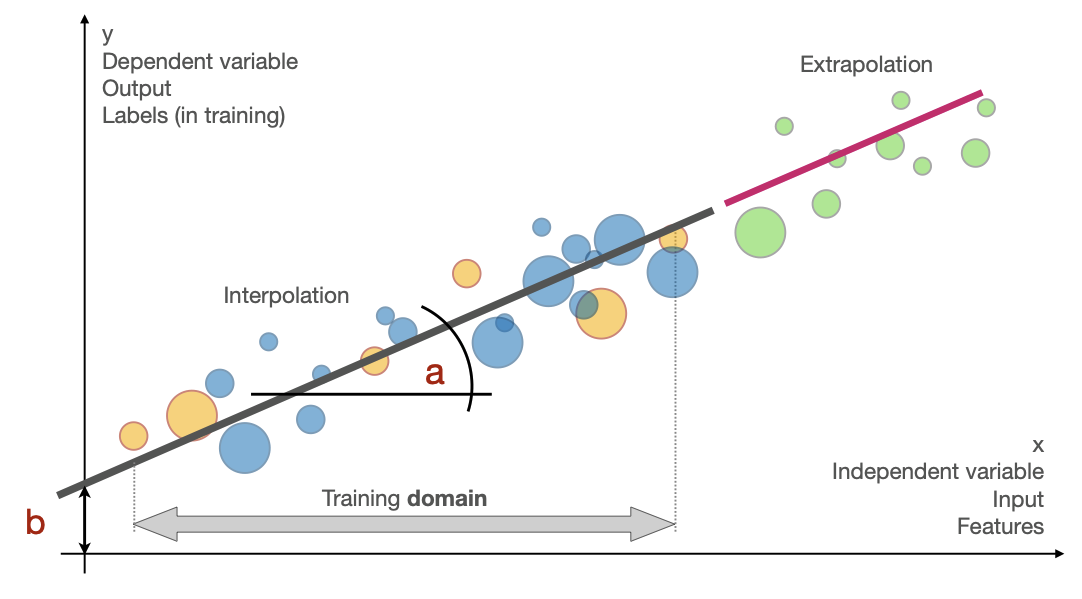
When you apply a model, it matters whether you are using it for interpolation (making predictions within the range of observed data) or extrapolation (making predictions beyond the observed range). Olympic 100-meter sprint records over time show the difference clearly.
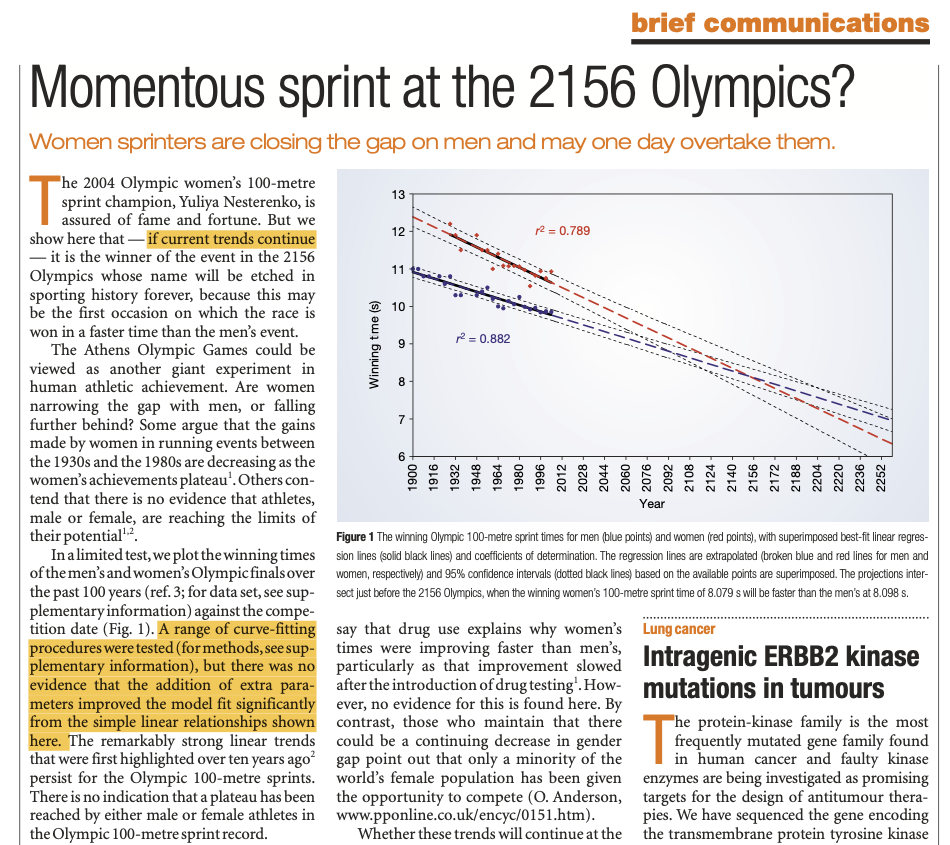
Misleading interpretations of models can appear even in the most prestigious journals. The figure above, published in Nature (2004), extrapolates Olympic sprint trends and arrives at a controversial prediction: that women would outperform men in the 100-meter sprint by 2156.
The interactive chart below repeats the analysis with Olympic winning times up to 2012, a few Games more than the original paper had. It shows the times from the early 1900s onward, with one linear regression fitted to the men's data and one to the women's data. The models extend their predictions to the year 2252, more than two centuries into the future.
What do these models predict? With the data up to 2012, the two lines cross around 2199 (not 2156, as in the paper), and in 2252 they predict about 7.4 s for men and 7.1 s for women. Follow the same lines further and they reach zero seconds (around 2734 for women and 2982 for men) and then become negative, which is physically impossible. Nothing in the data tells us where the lines stop being valid, and that is the basic problem with extrapolation.
When we fit models to historical data (1904–2012 for men, 1928–2012 for women), we capture trends that may be valid within that period. However, extrapolation assumes these trends continue indefinitely, and ignores several factors:
Physical limitations: Human sprint performance cannot improve indefinitely. Physiological constraints (muscle fiber types, energy systems, biomechanical efficiency) impose absolute limits that these models ignore.
Environmental and social changes: The steep improvement in women's performance reflects historical factors like increased participation, better training, and social acceptance of women's athletics. These improvements slow down as conditions approach parity.
Non-linear effects: The quadratic model for men (available via the checkbox) shows how performance improvements may plateau over time, a more realistic picture of diminishing returns than linear extrapolation.
Technological and regulatory boundaries: Track surfaces, shoe technology, altitude effects, and anti-doping measures all influence performance in ways that historical models cannot anticipate.
This is why extrapolation requires extreme caution. Interpolation uses the relationship we observed, inside the range where we observed it. Extrapolation goes beyond that range, where the model's assumptions may no longer hold. The further we extrapolate, the less reliable our predictions become.
The figure below summarizes the idea: a line (slope a, intercept b) fitted to data inside the training domain is reliable there (interpolation), but the data outside that domain may not follow it (extrapolation).
Overfitting: the hidden cost of complexity
When building models, it's tempting to believe that more complex models always provide better predictions. After all, if we can achieve a higher R² (coefficient of determination) by adding more parameters, shouldn't we do so? This logic leads us into one of the most common pitfalls in modeling: overfitting.
The interactive chart below demonstrates overfitting using real chicken growth data. We have only 5 data points representing weight measurements over time, and we can fit increasingly complex polynomial models:
- Linear Model: (2 parameters)
- Quadratic Model: (3 parameters)
- Cubic Model: (4 parameters)
- Quartic Model: (5 parameters)
(Higher R² indicates a better fit to the training data)
As you switch between models, notice that:
- R² increases with model complexity: the quartic model (5 parameters) fits all 5 data points perfectly (R² = 1.000)
- The prediction at 18 days, which lies inside the data range (2–21 days), stays around 172–174 g for the linear, quadratic and cubic models, but jumps to about 276 g with the quartic model, more than the 205 g measured at 21 days
- The quartic model produces the best fit to the training data but likely the worst predictions for new data
When we have 5 data points and 5 parameters (quartic model), we can fit the training data perfectly, but this creates several problems:
- No degrees of freedom: We cannot assess model validity when parameters equal data points
- Poor generalization: The model memorizes training data rather than learning underlying patterns
- Implausible predictions between and just beyond the data points: the quartic curve swings up and down between the measurements and drops below zero just after the last one (around day 23)
- Increased sensitivity: Small changes in data can dramatically alter the model
This is the bias-variance tradeoff: simple models (linear) may have higher bias (systematic error) but lower variance (sensitivity to data changes), while complex models (quartic) may have lower bias on training data but higher variance and poor generalization.
In practice: prefer the simpler model when its fit is reasonable, check that its predictions are biologically plausible, add parameters only when you can justify them, and validate predictions on independent data whenever possible.
The linear model has the lowest R², but it gives the most stable and interpretable relationship between chicken age and weight, and the one most likely to hold for new data.
Comes back inReactive hypoglycemia · Statistical modeling approachModule 5 · The curse of dimensionality
Wrap-up
Well done, you have completed the second module of this course.